
One of the first questions businesses ask when planning an ERP project is simple enough: how much does ERP software development cost?
The honest answer is that it varies enormously. An ERP platform connecting a few departments needs a relatively modest development budget. A large enterprise platform covering finance, inventory, CRM, HR, procurement, reporting, mobile applications, automation, and third-party integrations is a different scale of technology project altogether.
There is no single fixed price for ERP software development, because the cost depends entirely on what the system needs to do. The more useful question is: what factors determine the cost of building an ERP system?
This guide covers the major ERP development cost factors, the common project categories, the expenses businesses routinely forget to budget for, the implementation stages beyond development, and how to reduce cost without compromising the long-term quality of the platform.
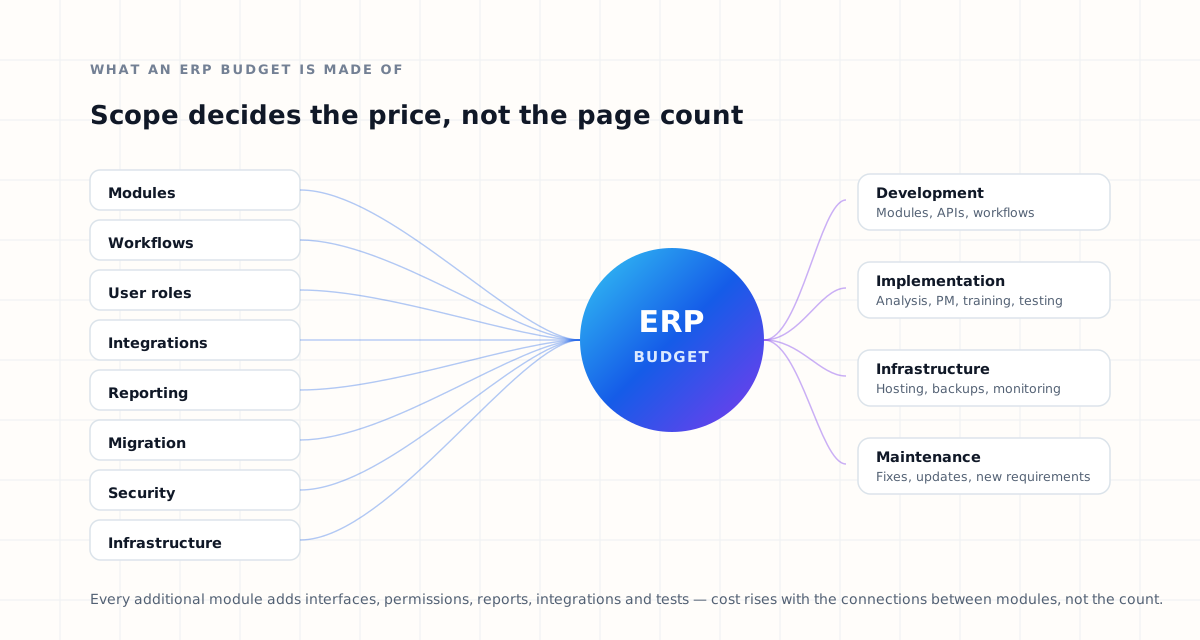
What is ERP software?
Enterprise Resource Planning — ERP — is software that connects multiple business functions within one centralised platform. Depending on the organisation, an ERP system may manage CRM, sales, finance, accounting, inventory, procurement, human resources, customer service, projects, operations, reporting, workflow approvals, documents, and business intelligence.
The objective is to reduce the number of disconnected systems and give departments a shared operational platform. When a sales order is created, for example, an ERP system may automatically update inventory, notify finance, generate an invoice, and trigger a fulfilment workflow. If that idea is new to you, start with our guide to building a custom ERP platform and come back to the numbers afterwards.
The complexity of those workflows has a direct impact on ERP software development cost. Counting screens tells you very little; counting the rules behind them tells you most of what you need to know.
How much does custom ERP development cost?
Custom ERP software ranges from a focused internal platform to a large enterprise ecosystem involving dozens of modules and integrations. For budgeting purposes, ERP projects can generally be thought of in three categories.
Small ERP system
A smaller ERP application might include CRM, basic sales management, invoicing, employee management, simple reporting, and user permissions. This suits smaller organisations replacing spreadsheets and disconnected tools.
Mid-sized ERP platform
A more advanced ERP may add finance, inventory, procurement, HR, customer support, dashboards, approval workflows, and external integrations. This category usually requires more detailed architecture and a meaningful amount of workflow automation.
Enterprise ERP platform
Large ERP implementations tend to involve multiple business entities and locations, multi-currency support, advanced financial workflows, complex permissions, mobile applications, business intelligence, API ecosystems, high transaction volumes, regulatory requirements, advanced automation, and custom infrastructure. These systems require significantly more engineering, testing, infrastructure, and implementation work.
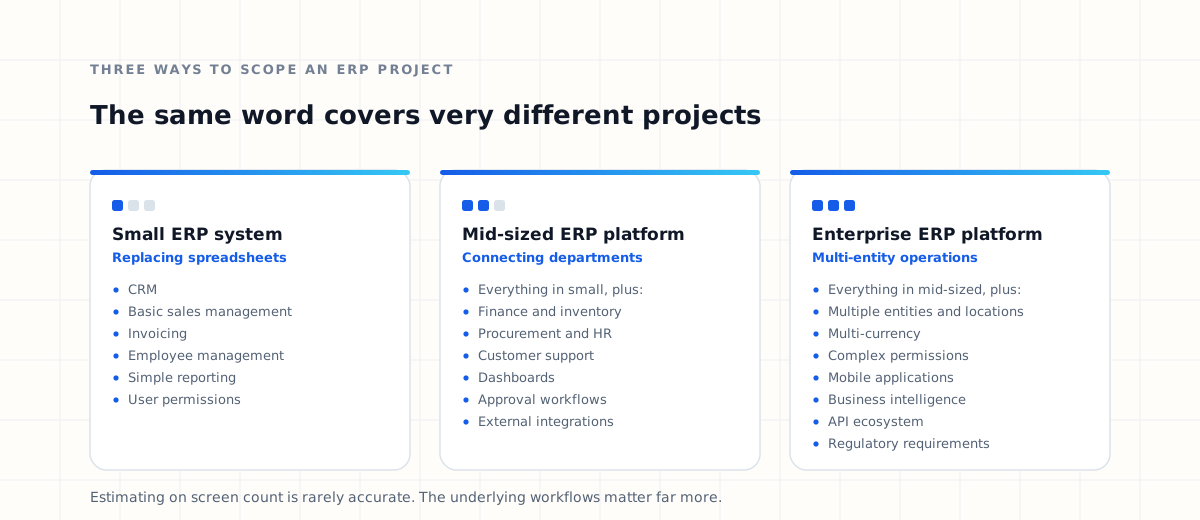
Estimating an ERP project on the number of screens alone is rarely accurate. The underlying workflows matter far more.
What determines ERP software development cost?
Several factors influence the final cost of a custom ERP platform. In practice, these ten account for most of the variation between one quote and another.
1. Number of ERP modules
The number of modules is one of the biggest cost factors. An ERP containing CRM and invoicing naturally requires less development than a platform connecting ten interdependent departments. Here is what the common modules typically contain:
CRM
- Lead management
- Customer profiles
- Opportunity tracking
- Sales pipeline
- Follow-ups
- Customer history
Sales
- Quotations
- Orders
- Pricing rules
- Sales targets
- Approvals
- Commission calculations
Finance
- Invoices
- Expenses
- Payments
- Reconciliation
- Financial reports
- Tax information
Inventory
- Stock management
- Warehouses
- Product tracking
- Stock transfers
- Low-stock notifications
- Inventory valuation
Procurement
- Vendors
- Purchase requests
- Purchase orders
- Approvals
- Goods received
- Supplier invoices
Human resources
- Employee records
- Attendance
- Leave
- Payroll
- Performance
- Documents
Customer support
- Tickets
- Escalations
- Assignments
- Customer complaints
- Resolution tracking
Reporting
- Role-based dashboards
- Filtering and drill-down
- Scheduled reports
- Exports
- Business intelligence
Every additional module introduces new database relationships, interfaces, permissions, workflows, reports, integrations, and testing requirements. The cost does not rise in a straight line — it rises with the connections between modules. Deciding which ERP modules a business actually needs is therefore the single most effective way to control the estimate.
2. Business workflow complexity
Two companies may both need an ERP sales module and still need completely different systems. One might operate a simple chain from enquiry to invoice; the other may route the same deal through qualification, compliance, and several approval gates first.
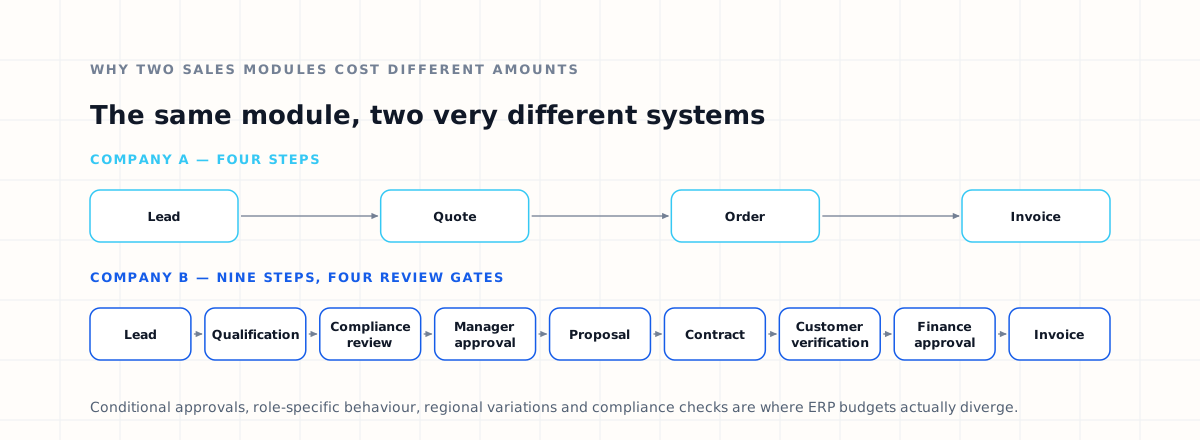
The second workflow requires substantially more development, and business rules such as conditional approvals, role-specific behaviour, regional variations, automated calculations, compliance checks, and notification rules add further complexity. This is exactly why ERP cost estimation should start with business process analysis rather than a feature list.
3. Number of users and roles
ERP platforms usually contain many types of users — administrators, sales executives, sales managers, finance staff, HR managers, warehouse employees, procurement officers, support agents, regional managers, and executives — and each may need different permissions.
A salesperson may create quotations but not approve discounts. A manager may approve discounts but not modify accounting records. Finance staff may access invoices but not HR documents. Building secure role-based access control becomes progressively more complex as departments and permission levels multiply.
4. ERP integrations
Integrations are among the most important factors affecting ERP development cost. Modern businesses frequently connect ERP systems with payment gateways, banks, accounting software, e-commerce platforms, shipping providers, email and SMS services, WhatsApp, CRM applications, cloud storage, identity verification, analytics systems, and government platforms.
A straightforward integration against a well-documented API may require relatively little work. A poorly documented or legacy system can require considerably more engineering. Integration cost also depends on:
- Authentication methods
- API rate limits
- Data mapping
- Error handling
- Webhooks
- Synchronisation frequency
- Security requirements
- Sandbox and testing access
Prepare a complete integration list before requesting development estimates. Integrations discovered mid-project are one of the most common causes of ERP budget overruns.
5. Custom reporting and dashboards
Reporting is frequently underestimated during ERP planning. Management typically wants visibility into revenue, sales performance, outstanding invoices, expenses, inventory, employee performance, customer activity, branch performance, profit margins, and procurement trends — and different departments usually want different views of it.
Interactive dashboards, filtering systems, export functionality, scheduled reports, and business intelligence capabilities all add real development work. Reporting is also, however, one of the areas where ERP software generates the most visible business value.
6. UI/UX design
ERP platforms can become extremely complex, and poorly designed interfaces reduce productivity while increasing training requirements. Good ERP UX focuses on clear navigation, fast access to frequent tasks, role-specific dashboards, efficient data entry, consistent forms, useful search, smart filtering, and responsive design.
A simple internal ERP may need relatively basic interface work. A customer-facing or enterprise-grade application usually requires far more detailed UX research and design.
7. Mobile application development
Sales representatives, warehouse employees, delivery teams, field service workers, managers, and remote staff may all need ERP access on mobile. A mobile ERP application might include dashboards, approvals, notifications, customer management, inventory scanning, document uploads, GPS functionality, and offline access.
Native or cross-platform mobile development expands project scope and therefore cost. Decide whether employees genuinely need mobile functionality before including it in the first ERP release.
8. Data migration
Companies implementing ERP software usually have years of business data spread across spreadsheets, databases, CRM platforms, accounting software, legacy systems, and documents. Moving that into the new environment can be substantial work:
- Exporting existing data from every current system
- Cleaning duplicate, incomplete, or incorrect records
- Mapping old fields to the new data model
- Transforming formats, units, and identifiers
- Importing the information
- Validating records against the source
The quality and structure of your existing data affects migration cost more than its volume does.
9. Security requirements
ERP systems hold sensitive business information, so security features such as authentication, multi-factor authentication, role-based permissions, encryption, audit logs, session management, API security, IP restrictions, backup policies, and monitoring are part of the scope. Organisations in regulated industries may need additional compliance controls. Security should be planned during ERP architecture rather than added afterwards.
10. Cloud infrastructure
ERP software needs infrastructure, and infrastructure cost depends on user numbers, transaction volume, database size, file storage, backups, geographic availability, monitoring, security, and redundancy.
Small ERP systems may run on relatively simple cloud infrastructure. Large enterprise applications may require load balancing, multiple application instances, database replication, container orchestration, high availability, disaster recovery, and advanced monitoring. Infrastructure belongs in the ERP budget from the beginning.
ERP implementation costs beyond development
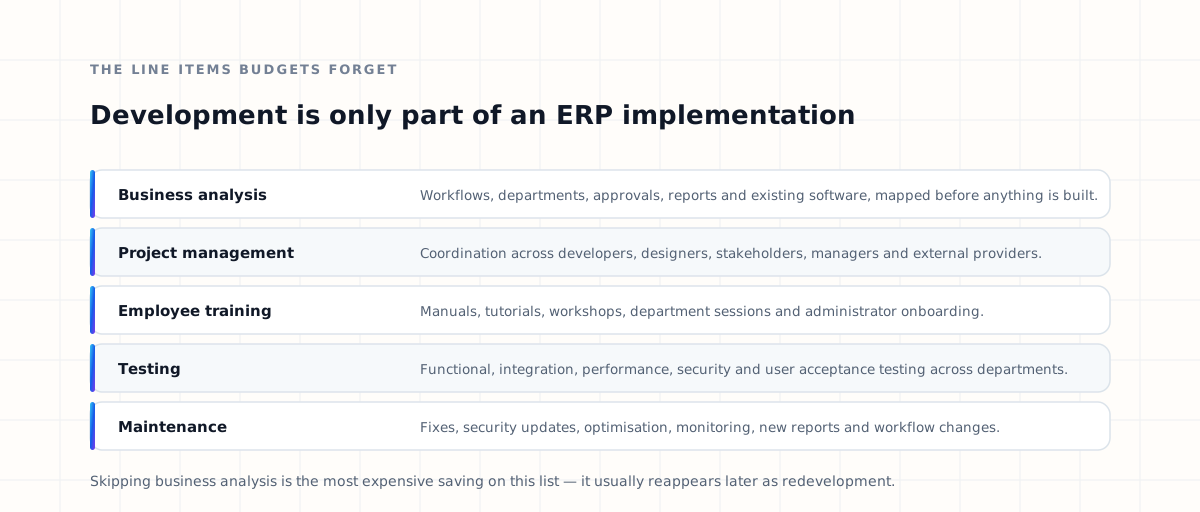
The software itself is only one part of an ERP implementation. Several other activities need to be budgeted for — each of them a stage in the wider ERP implementation process.
Business analysis
Before development begins, the technology team needs to understand current workflows, departments, operational problems, approval processes, integrations, reports, and existing software. Skipping this stage tends to produce expensive redevelopment later.
Project management
Large ERP projects require coordination between developers, designers, business stakeholders, department managers, infrastructure teams, and external providers. Effective project management is what prevents scope confusion and implementation delays.
Employee training
Even well-designed ERP systems require onboarding — user manuals, video tutorials, workshops, department-specific sessions, and administrator training. Employee adoption is essential to ERP success, and it is not free.
Testing
ERP software affects multiple departments simultaneously, so functional, integration, performance, security, and user acceptance testing all matter. Testing should not be treated as an optional line item.
Maintenance
ERP systems evolve alongside the business. Long-term maintenance covers bug fixes, security updates, performance optimisation, infrastructure monitoring, new reports, additional integrations, and workflow changes. Plan for it before launch, not after.
How to reduce ERP development cost
Reducing cost does not mean choosing the cheapest development provider. The more effective strategy is reducing unnecessary complexity.
Start with an MVP
Do not try to build every possible ERP feature in the first release. Identify the processes causing the greatest operational pain and sequence the rest:
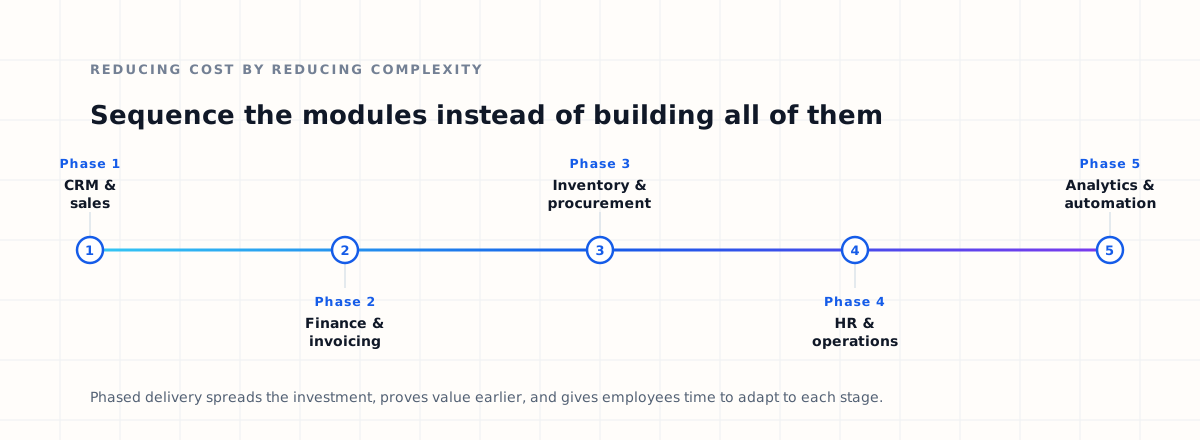
Phased implementation makes the project easier to manage and gives employees time to adapt to each stage.
Define requirements clearly
ERP requirements should be documented before development begins. The questions worth answering first:
- Which departments will use the system?
- Which workflows should be automated?
- Which applications require integration?
- Which reports are genuinely required?
- Who can access each module?
- Which data must be migrated, and from where?
Clear requirements reduce development uncertainty — and uncertainty is what makes estimates expensive.
Avoid unnecessary features
ERP projects grow easily, because every department requests additional functionality. For each request, ask whether it solves a real business problem, reduces manual work, improves reporting, supports compliance, or improves customer experience. Features without measurable operational value can usually be postponed.
Use existing services when appropriate
Not every ERP component needs to be built from scratch. Authentication, email, SMS, file storage, payment processing, and analytics can often be handled by reliable existing services, which reduces both cost and development time.
Build a scalable architecture
Poor architecture looks cheaper initially and becomes expensive later. A scalable ERP architecture makes it straightforward to introduce new modules, users, countries, branches, integrations, and workflows without rebuilding what already works.
Custom ERP vs ready-made ERP cost
Businesses should also compare custom development against commercial ERP platforms. Price is only one axis of that decision; we compare custom and ready-made ERP across flexibility, integrations, ownership, and vendor dependency in a separate guide.
Ready-made ERP pricing
Commercial platforms typically charge monthly subscription fees, per-user licences, module fees, implementation charges, consulting fees, integration fees, and premium support. For smaller organisations this can be economical — but recurring licensing costs can rise sharply as the company grows.
Custom ERP pricing
Custom ERP development generally requires a larger upfront investment. In return, the business gains greater control over features, integrations, infrastructure, workflows, user experience, and the development roadmap.
Compare the two on total cost of ownership across several years, not on initial price. Per-user licensing and custom development scale in opposite directions as headcount grows.
Should you build ERP software from scratch?
Building entirely from scratch makes sense when an organisation has genuinely specialised requirements. It is not always necessary. Evaluate existing ERP platforms, internal systems, available APIs, and current business processes first.
Sometimes the best architecture combines custom modules with existing software. A company might retain its accounting platform while building a custom CRM and operational ERP around it, with the systems communicating through APIs. This hybrid approach can reduce development cost while preserving flexibility.
Our own ERP solution is built along those lines — a connected core of standard modules that custom work extends where a business needs it.
How to get an accurate ERP development estimate
The most reliable way to estimate ERP cost is through a discovery process. Before requesting a quote, prepare the following:
- Required modules — the business areas the ERP must support.
- User types — departments, roles, and permission levels.
- Business workflows — the major processes, including approvals.
- Integrations — external applications and APIs to connect.
- Data migration — where existing information currently lives.
- Reporting — the dashboards and reports that actually get used.
- Mobile requirements — whether mobile applications are necessary.
- Infrastructure — security, availability, and hosting expectations.
With that information, a development company can estimate against actual requirements instead of guessing — and the resulting number is one you can plan around.
Is custom ERP worth the investment?
The value of ERP software should be measured against the operational problems it solves. A successful platform can help a business:
- Reduce manual work
- Remove duplicate data entry
- Improve reporting accuracy
- Speed up approvals
- Improve customer service
- Improve inventory visibility
- Connect departments
- Automate repetitive processes
- Improve management visibility
If employees collectively spend hundreds of hours every month on manual administrative work, even modest automation generates significant long-term savings. ERP is best evaluated as business infrastructure, not as a one-off software expense.
Build a scalable ERP platform with Dynsimulation
ERP development is more than connecting forms to a database
A successful ERP system has to combine business process analysis, software architecture, API integrations, UI/UX, security, cloud infrastructure, workflow automation, reporting, and long-term scalability. At Dynsimulation Technologies we design and develop custom ERP platforms, enterprise applications, integrations, and automation systems around real business requirements.
Our Dynatlas platform already connects CRM, sales, finance, inventory, procurement, HR, customer support, reporting, and integrations in one environment. Whether you are replacing spreadsheets, modernising an existing ERP, or building a new enterprise platform, the first step is understanding your workflows.
Frequently asked questions about ERP development cost
How much does custom ERP software cost?
There is no single price. The cost depends on the number of modules, users and roles, integrations, workflow complexity, reporting requirements, data migration, security requirements, infrastructure, and whether mobile applications are included.
Why is ERP software expensive?
ERP platforms connect multiple business departments and contain complex workflows, integrations, permissions, reporting, and business-critical data. That makes ERP development considerably more involved than building a single-purpose application.
What is the biggest factor affecting ERP development cost?
Workflow complexity and the number of interconnected modules are usually the two largest cost drivers. Two companies can request the same module list and still need very different systems.
Can ERP development be done in phases?
Yes, and in most cases phased delivery is the more practical approach. Businesses can start with the highest-priority modules and introduce additional capabilities over time.
Does ERP development include cloud hosting?
Cloud infrastructure is generally a separate ongoing cost. It depends on user numbers, storage, transaction volume, availability targets, and security requirements.
Is custom ERP cheaper than SaaS ERP?
Custom ERP usually costs more initially, while SaaS ERP involves recurring subscription and licensing fees. The long-term comparison depends on user numbers, customisation requirements, and how quickly the organisation grows.
How long does ERP implementation take?
Implementation time depends on complexity. A focused project covering a few modules is far shorter than an enterprise implementation, which is normally delivered across multiple development phases.
Can existing software be integrated into a custom ERP?
Yes. Existing CRM, accounting, payment, logistics, communication, and other platforms can usually be connected through APIs rather than replaced.
How can businesses reduce ERP development costs?
Start with the highest-priority modules, define requirements clearly before development begins, avoid features without measurable operational value, reuse reliable existing services where appropriate, and implement the system in phases.
How do I get an ERP development quote?
Prepare your required modules, workflows, integrations, user roles, reporting requirements, existing systems, and data migration needs. A development team can then estimate against actual requirements instead of assumptions.
- Custom ERP Software DevelopmentThe full build guide — architecture, modules, integrations and delivery phases.
- ERP Implementation ProcessFollow the stages that take an ERP from discovery through migration to a stable go-live.
- ERP Modules ExplainedWork out which modules your operations genuinely need, and which can wait.