
Implementing an ERP system is not a software installation. It is a business transformation project that happens to involve software.
A successful implementation connects departments, automates repetitive work, improves reporting, removes duplicate data entry, and gives management a reliable view of operations. A poorly planned one creates confusion, slows adoption, increases cost, and quietly pushes teams back to the spreadsheets they were supposed to leave behind.
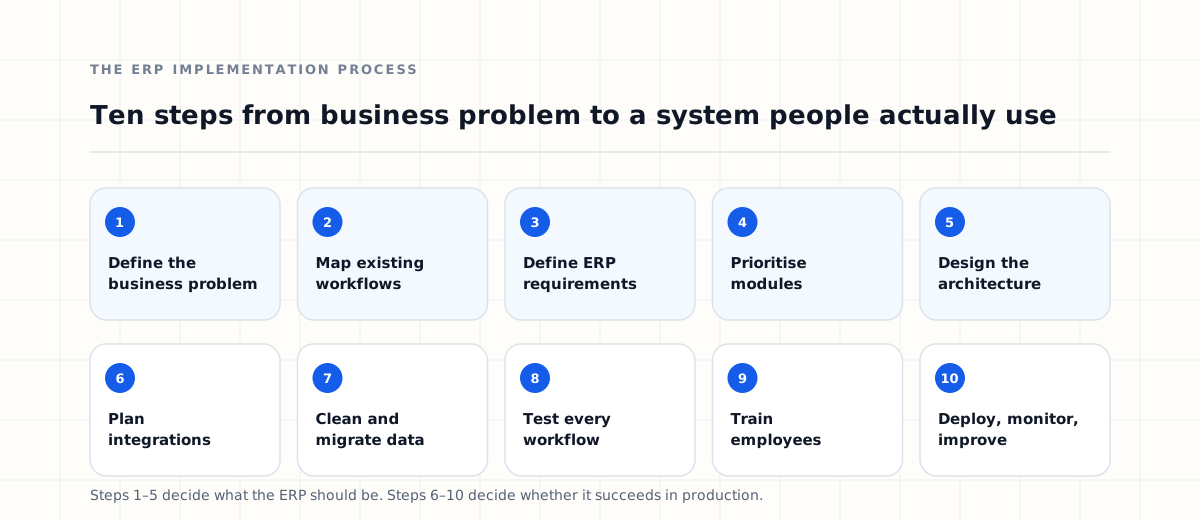
The difference is almost always preparation. This guide walks through the complete ERP implementation process — the ten steps to plan, build, test, deploy, and continuously improve the system — along with deployment strategies, team structure, and the mistakes that derail projects most often.
What is ERP implementation?
ERP implementation is the process of introducing an Enterprise Resource Planning system into an organisation. It normally covers understanding business requirements, mapping current workflows, selecting or building the platform, configuring modules, integrating external systems, migrating existing data, testing workflows, training employees, deploying, and optimising after launch.
The scope varies enormously. A smaller implementation might focus on CRM, sales, and invoicing for one team. A larger one connects sales, finance, inventory, procurement, human resources, customer support, operations, reporting, and a set of external applications. Where the platform is being built rather than bought, our guide to custom ERP development covers what happens before this process begins.
The more departments and systems involved, the less the outcome depends on the software and the more it depends on the implementation strategy. Complexity does not grow with the number of modules — it grows with the number of connections between them.
Why ERP implementations fail
ERP projects rarely fail because the technology could not do the job. They fail for business and process reasons:
- Requirements gathered too quickly
- Project scope left undefined
- Inaccurate or duplicated data
- Employees excluded from the process
- Excessive customisation
- Weak project management
- Inadequate testing
- Rushed or generic training
- Unrealistic timelines
- Too many modules launched at once
Every item on that list is decided before a line of code is written. Which is why a successful implementation starts by understanding the organisation, not by deciding how the technology should work.
The ERP implementation process: 10 key steps
The ten steps below run roughly in order, though in practice several overlap — integration planning often continues while development is underway, and training material is best written while the system is still being tested.
1Define the business problem
Before selecting or developing anything, establish why the organisation needs an ERP. “We need an ERP” is not a requirement; it is a conclusion someone reached without stating the premise.
Start instead from the problems the system should solve:
- Sales and finance work in separate systems that never agree.
- The same information is entered several times by different people.
- Management reports take days to prepare and are outdated on arrival.
- Inventory figures are frequently wrong.
- Purchase approvals happen over email with no audit trail.
- Customer information is spread across personal spreadsheets.
- Nobody can tell what stage an internal request has reached.
These problems become the foundation of the implementation strategy — and later, the measure of whether it worked. Useful questions at this stage: which processes create the most delay, which tasks are repetitive manual work, which information is hardest to reach, where do errors keep appearing, and which departments most need to share data?
2Map existing business processes
The next stage is documenting how the business actually operates today — workflow mapping, or business process analysis. For each department, record the tasks, approvals, data entry points, documents, reports, dependencies, external systems, and user roles involved.
A purchase process might currently look like this:
Employee request → Manager approval → Finance approval → Supplier quotation → Purchase order → Goods received → Invoice → Payment
Writing it down makes the bottlenecks visible: duplicate steps, manual re-entry, approvals nobody remembers authorising, and the points where work sits waiting. Those are the automation opportunities.
ERP implementation should not copy inefficient processes into new software. If a step exists only because the old system required it, rebuilding it faithfully is paying twice for the same problem.
3Define ERP requirements
Once workflows are understood, define what the ERP must do, grouped by functional area.
Sales
- Lead management
- Quotations
- Sales orders
- Customer history
- Discount approvals
- Sales reporting
Finance
- Invoice generation
- Payment tracking
- Expense management
- Reconciliation
- Tax handling
- Financial reports
Inventory
- Warehouse management
- Product tracking
- Stock movements
- Low-stock alerts
- Stock valuation
- Purchase planning
Human resources
- Employee records
- Attendance
- Leave management
- Payroll
- Documents
- Performance reviews
Requirements should also cover the cross-cutting concerns that are easy to forget until late: user permissions, reports, integrations, notifications, automation rules, mobile access, and security. The clearer these are, the more accurate every subsequent estimate becomes — and the easier it is to judge whether to build or buy the platform on evidence rather than instinct.
4Prioritise ERP modules
One of the biggest mistakes in ERP implementation is trying to launch everything simultaneously. Large platforms contain dozens of modules, and a business cannot absorb dozens of workflow changes in one week. Prioritise by operational impact instead:
A phased approach delivers something useful sooner, makes adoption easier, keeps testing manageable, lowers project risk, and makes development more predictable. It also means feedback from the first modules can shape the ones built later — which is the single cheapest form of course correction available. Our breakdown of the individual ERP modules explains what each one does, which helps when ordering the phases.
5Design the ERP architecture
With scope agreed, the technical architecture can be designed: database structure, backend and frontend frameworks, authentication, role-based access, API design, cloud infrastructure, backups, logging, and monitoring.
Larger enterprise platforms may additionally involve microservices, message queues, API gateways, containers, orchestration, load balancing, and high-availability configuration — though none of these should be adopted because they are expected rather than because the workload requires them.
The architecture must serve both current requirements and realistic growth. A system that works well for 20 employees should not need rebuilding when the organisation reaches 200.
The ERP systems we build follow that principle, with modules, permissions, and integrations designed to expand without a rewrite.
6Plan ERP integrations
Almost every ERP has to communicate with software the business already relies on: payment gateways, banking systems, accounting platforms, CRM tools, e-commerce systems, shipping providers, email, SMS, WhatsApp, cloud storage, identity verification, and analytics.
Document each one. For every external system, answer six questions:
- What data needs to move between the systems?
- Which system is the authoritative owner of that data?
- How often does it need to synchronise?
- Does the service provide a usable API, and what are its limits?
- How are failures detected, retried, and reported?
- What authentication and security method is required?
Integrations that were never scoped properly are among the most expensive parts of an ERP project, because they surface late — usually during testing, when the schedule has no room left. An API-first architecture and an early integration inventory reduce that risk considerably.
7Prepare and migrate data
An ERP is only as reliable as the information inside it. Most organisations arrive with data spread across Excel, Google Sheets, an old CRM, accounting software, legacy databases, documents, and local applications.
That data almost always needs cleaning first. Expect:
- Duplicate customer records
- Missing contact information
- Incorrect or reused product codes
- Employees who left years ago
- Inconsistent date and number formats
- Invalid email addresses
- The same supplier under three names
The migration itself follows a predictable sequence:
- 1Identify every data source.
- 2Export the existing records.
- 3Clean and validate them.
- 4Map fields to the new structure.
- 5Transform formats where they differ.
- 6Import into the ERP.
- 7Verify the migrated data against the source.
Migrating poor-quality data without cleaning it does not give you a fresh start. It gives you the same problems in a more expensive system, and it costs you the trust of the people who have to use it.
8Test the ERP system
Testing matters more in ERP than in most software, because the modules are interdependent. A small defect in one workflow can surface as a wrong number in a department that never touches that screen.
Functional testing
Confirm each feature behaves correctly on its own.
Integration testing
Confirm external systems exchange data correctly, including what happens when one of them is slow or unavailable.
Permission testing
Confirm every role can reach exactly what it should — and nothing else. Permission gaps in an ERP expose payroll, margins, and customer data.
Performance testing
Check behaviour under realistic user counts, transaction volumes, and report sizes rather than under empty-database conditions.
Security testing
Test authentication, session handling, API access, permission boundaries, and how sensitive data is stored and transmitted.
User acceptance testing
Real employees should use the system before go-live, on their own work. This stage consistently uncovers workflow problems that technical teams cannot see, because only the people doing the job know which exceptions occur every week.
9Train employees
Even an excellent platform fails if the people using it do not understand it. Training should be role-specific rather than a single session covering everything.
Sales team
- Leads and opportunities
- Quotations
- Customer records
- Follow-ups
- Pipeline reporting
Finance team
- Invoices
- Payments
- Expenses
- Reconciliation
- Financial reports
Managers
- Dashboards
- Approval workflows
- Reporting
- Performance tracking
- Exceptions and escalations
Support the sessions with written documentation, short videos, workshops, interactive demos, and a searchable internal knowledge base — and start before launch, not after the first complaints arrive.
10Deploy, monitor, and improve
ERP implementation does not end on launch day. After deployment, monitor system performance, user activity, integration errors, support requests, failed workflows, report accuracy, and infrastructure health.
Collect employee feedback deliberately rather than waiting for it. Users will ask for faster workflows, better reports, additional automation, improved search, new integrations, and interface changes — and the ones who ask are the ones who have adopted the system.
Treat the ERP as a product rather than a project. The business will keep changing; the system that stops changing with it becomes the next legacy platform someone has to replace.
ERP deployment strategies
There are three common ways to move an organisation onto a new ERP, and the choice materially changes the risk profile.
Big bang deployment
Every department moves to the new system on the same date. The transition is faster overall and avoids running duplicate systems, but troubleshooting is harder, training demand peaks all at once, and there is no fallback if something significant breaks. This suits smaller or less complex organisations.
Phased deployment
Modules or departments move gradually — CRM in month one, sales in month two, finance in month three, inventory in month four. Risk is contained, adoption is easier, and each phase informs the next. For most organisations this is the safer strategy.
Parallel deployment
The old and new systems run simultaneously for a period so results can be compared before committing. It is the most cautious option and the most demanding one: staff do the work twice, and discrepancies between the two systems need investigating rather than ignoring.
ERP implementation team structure
Successful implementations involve both technology and business people. The roles below do not all need to be separate individuals in a smaller project, but the responsibilities still need owners.
Project sponsor
Provides executive backing, resolves cross-department disputes, and protects the project's priority when other work competes for attention.
Project manager
Owns scope, timeline, dependencies, and communication between business and technical teams.
Business analysts
Document current workflows, gather requirements, and translate operational needs into specifications.
Developers
Build modules, workflows, permissions, and integrations, and maintain the platform after launch.
UI/UX designers
Design the screens and flows employees will use every working day — the largest single influence on adoption.
QA engineers
Test functionality, integrations, permissions, performance, and security before anything reaches production.
Infrastructure engineers
Handle deployment, environments, backups, monitoring, and cloud infrastructure.
Department representatives
Real users from sales, finance, HR, and operations who validate that the system matches how work is actually done.
Department involvement is not a formality. An ERP designed exclusively by the IT team reflects how the business is documented, not how it runs.
How long does ERP implementation take — and what does it cost?
Implementation time depends on the number of modules and users, workflow complexity, integrations, data migration, customisation depth, testing, training, and infrastructure. A focused implementation may take a few months; a large enterprise programme is normally delivered across several phases rather than as a single date in a calendar.
Rather than optimising for speed, optimise for clear requirements, reliable workflows, accurate data, and employee adoption. Launching quickly on an unstable system reliably costs more than launching later on a stable one.
Cost follows a similar pattern. Budgets need to account for development or licensing, consulting, integrations, data migration, infrastructure, training, customisation, maintenance, and support. Compare options on total cost of ownership: a custom ERP usually requires a higher upfront investment in exchange for flexibility, while a ready-made platform starts cheaper and accumulates licensing and customisation costs as the business grows.
We cover this in detail in our guide to ERP software development cost.
Common ERP implementation mistakes
Building everything at once
Start with the workflows that carry the most operational pain. Everything else can wait for a later phase.
Migrating bad data
Clean before importing. Bad data undermines confidence in the system faster than any missing feature.
Ignoring user experience
Employees work in an ERP all day. A clumsy interface is not a cosmetic issue — it is a permanent tax on productivity.
Over-customising
Not every process deserves custom functionality. Simplify the workflow before automating it.
Excluding employees
Users should participate in requirements gathering and testing, not receive the result as an announcement.
Treating integrations as an afterthought
External systems should be identified during discovery, not discovered during testing.
Skipping documentation
Processes, permissions, and workflow rules need to be written down. Undocumented decisions become unexplainable behaviour a year later.
ERP go-live checklist
Before deployment, confirm that:
- Business requirements are documented
- Workflows are mapped and agreed
- Modules are prioritised into phases
- User roles are defined
- Permissions have been tested
- Integrations are working end to end
- Data has been cleaned
- Migration has been validated against sources
- Employees have been trained
- Reports have been verified
- Security controls have been tested
- Backups are configured and restorable
- Monitoring and alerting are active
- Support processes are defined
Nothing on this list is dramatic. Every one of them is a surprise if it is missing on launch day.
How to improve ERP adoption
Technology alone does not produce adoption. Employees need to understand why the change is happening, so communicate clearly: what problems the ERP solves, how each team benefits, which workflows are changing, where training is available, and how to report problems.
Management also has to make a decision and hold it. If teams are allowed to maintain the ERP and their old spreadsheets indefinitely, many will keep using the spreadsheets and treat the ERP as extra work. When the ERP is unambiguously the official source of information, adoption follows.
Should you customise your ERP?
Customisation should solve genuine business requirements — a workflow unique to the organisation, an industry regulation, a specialised approval chain, a proprietary process, or an integration the business depends on.
It is a poor investment when it exists to replicate every feature of an old system, preserve an inefficient process because people are used to it, or add functionality that will be used twice a year.
The objective is an efficient ERP, not a faithful reproduction of the past. Every customisation is also something that must be maintained, tested, and migrated for as long as the system lives.
Implement ERP with Dynsimulation
The implementation decides whether the software succeeds
A successful ERP rollout requires more than development. It needs business process analysis, workflow automation, software architecture, API integrations, data migration, user experience, security, cloud infrastructure, reporting, and a plan for scale. At Dynsimulation Technologies we design and implement custom ERP platforms, enterprise applications, API ecosystems, and automation systems around how businesses actually operate.
Our Dynatlas platform connects CRM, sales, finance, inventory, procurement, HR, customer support, reporting, and integrations in one environment. Whether you are replacing disconnected spreadsheets, modernising an existing platform, or implementing a new ERP environment, the right implementation strategy significantly reduces risk.
Frequently asked questions about ERP implementation
What is the ERP implementation process?
ERP implementation is the process of planning, configuring or developing, integrating, testing, migrating data into, training users on, and deploying an ERP system within an organisation. It continues after launch through monitoring and improvement.
What are the main ERP implementation steps?
The main steps are defining the business problem, mapping existing workflows, gathering requirements, prioritising modules, designing the architecture, planning integrations, cleaning and migrating data, testing, training employees, and deploying with ongoing improvement.
How long does ERP implementation take?
Implementation time depends on the number of modules, users, integrations, the volume and quality of data to migrate, and how much customisation is required. A focused implementation covering a few modules is far shorter than an enterprise rollout, which is normally delivered across several phases.
What is the best ERP implementation strategy?
For most organisations phased implementation is the safest approach, because it reduces risk, keeps training manageable, and lets teams apply lessons from early modules to later ones.
Why do ERP implementations fail?
Most failures are business and process failures rather than software failures: unclear requirements, uncontrolled scope, poor-quality data, inadequate testing, limited employee involvement, insufficient training, and unnecessary customisation.
Is data migration part of ERP implementation?
Yes. Customer, financial, inventory, employee, supplier, and operational records usually need to be extracted, cleaned, mapped, transformed, imported, and verified before the system can be trusted.
Do employees need ERP training?
Yes, and it should be role-specific. ERP systems change how people work, not just which screen they open, so sales, finance, operations, and management each need training built around their own workflows.
Can an ERP be implemented department by department?
Yes. Many organisations deploy modules gradually, starting with the department that has the greatest operational need, then extending the platform once that group is working comfortably in it.
What happens after ERP implementation?
Teams should monitor performance, user activity, integration errors, failed workflows, and support requests, collect employee feedback, and keep improving the system as the business changes.
Should ERP workflows copy existing processes?
Not always. Implementation is an opportunity to remove duplicate steps and unnecessary approvals. Copying an inefficient process into new software preserves the inefficiency and adds the cost of building it.
- Custom ERP Software DevelopmentThe full build guide — architecture, modules, integrations and delivery phases.
- ERP Modules ExplainedWork out which modules your operations genuinely need, and which can wait.
- ERP Software Development CostUnderstand which requirements actually move an ERP budget before you set one.