
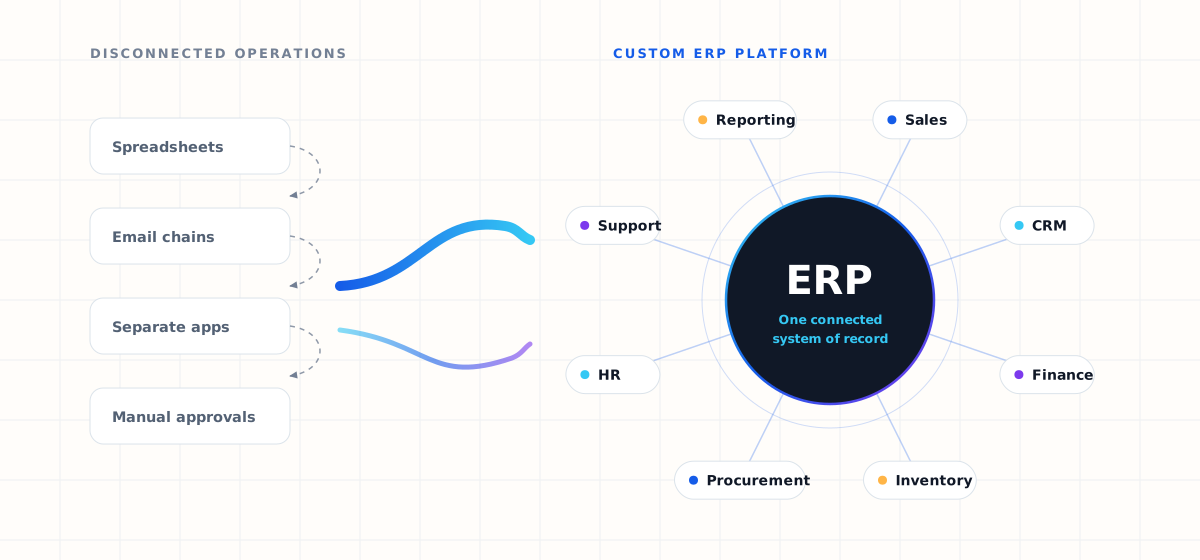
Growing businesses often reach a point where spreadsheets, disconnected applications, manual approvals, and separate departmental systems can no longer keep up with daily operations.
Sales works in one platform. Finance works in another. HR keeps its own records. Inventory is tracked somewhere else entirely. Management then spends valuable time combining information from several systems just to understand what is happening across the business.
This is where custom ERP software development can make a significant difference. Instead of forcing a company to adapt its processes to generic software, a custom ERP system is designed around the way the organisation actually operates.
This guide covers what custom ERP software is, how it works, which modules businesses commonly need, the benefits, the implementation process, integration considerations, and how to judge whether your organisation is ready for an ERP system.
What is custom ERP software development?
Enterprise Resource Planning (ERP) is software that connects important business functions within one centralised platform. A custom ERP system is designed specifically around an organisation's workflows, departments, permissions, reporting requirements, integrations, and operational processes.
Instead of maintaining separate applications for sales, CRM, finance, inventory, procurement, human resources, customer support, reporting, and project management, an ERP platform connects those functions through a common system.
Information entered by one department becomes available to other authorised departments automatically. That reduces duplicate work and creates a consistent flow of information throughout the organisation.
Custom ERP vs off-the-shelf ERP
Businesses generally have two options when selecting ERP software.
Off-the-shelf ERP
An off-the-shelf ERP is built for a broad range of businesses. It works well when your requirements closely match the workflows already available within the platform. Organisations with specialised processes, however, may eventually need extensive customisation, additional plugins, third-party applications, or manual workarounds — and those costs accumulate quietly over time.
Custom ERP
Custom ERP software is built around specific business requirements. Instead of changing your operations to fit the software, the software is designed to support your operations. A custom solution is particularly useful when your business has:
- Unique approval processes
- Multiple departments or branches
- Complex customer workflows
- Specialised reporting requirements
- Existing internal software to preserve
- Multiple third-party integrations
- Industry-specific processes
- Advanced user permission requirements
The right choice depends on business complexity, growth plans, available budget, implementation timelines, and long-term technology strategy. If that is the decision you are currently stuck on, our comparison of custom ERP versus off-the-shelf ERP works through it criterion by criterion.
Why businesses invest in custom ERP solutions
ERP implementation is not simply about replacing spreadsheets. The larger objective is to create a connected operational infrastructure.
1. Centralised business data
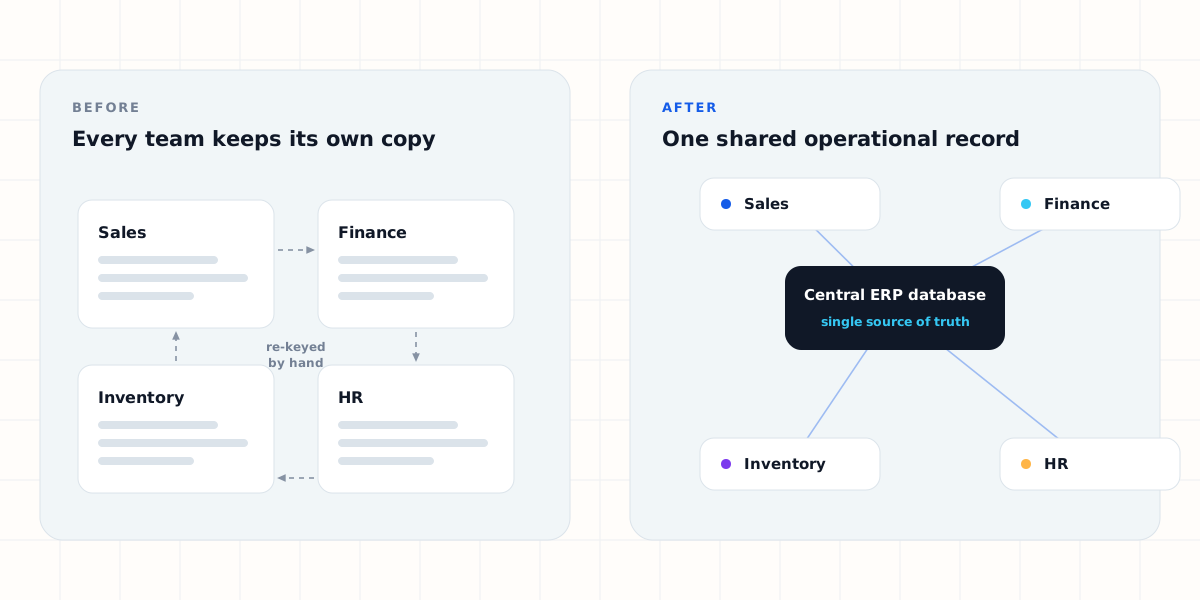
When departments operate independently, important information becomes scattered across applications, documents, emails, and spreadsheets. An ERP system provides one central source for operational information, so management can access business data without manually collecting reports from several teams.
2. Workflow automation
Many organisations still rely on employees to move information between systems by hand. A typical chain looks like this: sales creates an order, finance raises an invoice, inventory checks availability, procurement orders missing materials, and management tracks the whole process separately.
With ERP automation, many of those steps connect. A confirmed sales order can automatically trigger inventory checks, invoicing workflows, notifications, approval requests, or procurement actions.
3. Better operational visibility
Business leaders need accurate information to make decisions. ERP dashboards can provide visibility into revenue, expenses, outstanding payments, the sales pipeline, inventory levels, employee activity, procurement, customer requests, and project performance. Instead of waiting for periodic reports, authorised users pull what they need directly from the platform.
4. Reduced manual work
Repetitive data entry consumes employee time and increases the chance of inconsistent information. ERP systems can automate activities such as:
- Invoice generation
- Approval workflows
- Follow-up reminders
- Customer notifications
- Reporting
- Attendance processing
- Lead assignments
- Payment reconciliation
- Inventory updates
Automation allows teams to spend more time on higher-value work.
5. Scalability
Business software that works for a company with ten employees rarely works efficiently at hundreds of employees, multiple locations, additional products, or new business units. A properly designed ERP architecture allows additional modules, workflows, users, locations, integrations, and services to be introduced as requirements evolve.
Important modules in a custom ERP system
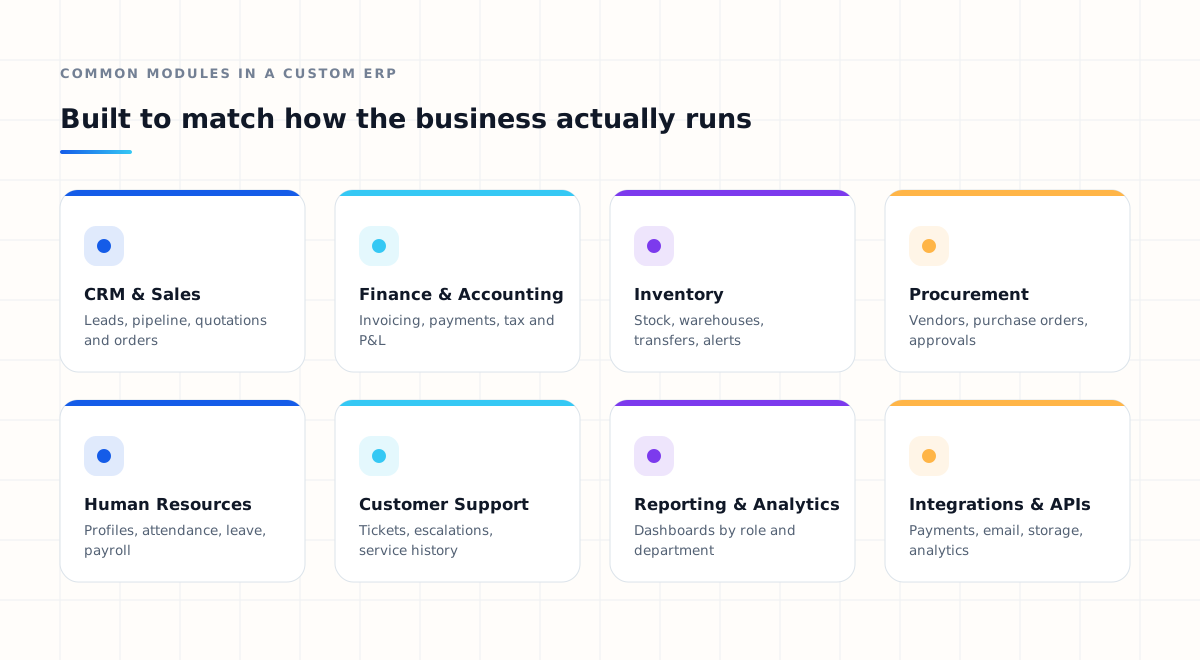
There is no universal ERP configuration. The correct modules depend on how the organisation operates — but several appear in most implementations. A fuller breakdown of the essential ERP modules covers what each one does and when it becomes worth building.
CRM and sales management
A CRM module manages the complete customer and sales lifecycle: lead management, customer profiles, sales pipelines, follow-up reminders, quotations, deal tracking, sales orders, and communication history. Connecting CRM with the rest of the ERP prevents customer information from becoming isolated inside the sales department.
Finance and accounting
Finance is often the most important ERP component. Features typically include invoicing, expense management, payment tracking, tax records, financial reports, cash-flow monitoring, reconciliation, and profit and loss reporting. When finance is integrated with sales, procurement, and inventory, transactions move through the organisation with considerably less manual coordination.
Inventory management
Businesses handling physical products need visibility into stock: stock levels, product management, warehouses, stock transfers, purchase orders, low-stock alerts, inventory history, and supplier information. Connecting sales and inventory also prevents teams from selling products without knowing current availability.
Procurement
Procurement modules manage vendor records, purchase requests, approval workflows, purchase orders, goods received, supplier invoices, and procurement reporting.
Human resource management
HR modules centralise employee profiles, attendance, leave management, payroll, departments, documents, performance tracking, and roles and permissions.
Customer support
Integrating customer service into the ERP gives support teams access to relevant customer and transaction information. Typical functionality covers support tickets, complaint management, service history, ticket assignments, escalations, and resolution tracking.
Reporting and analytics
ERP systems generate valuable operational data. Dashboards and reporting tools turn that information into insights for decision-makers, with separate views for executives, department managers, finance, sales, operations, and other authorised users.
The importance of ERP integrations
Modern organisations rarely run on a single application. Most already use some combination of payment gateways, accounting applications, CRM platforms, WhatsApp Business, email platforms, cloud storage, analytics tools, e-commerce platforms, telephony services, banking systems, and logistics providers.
Replacing every application is rarely necessary. A well-designed ERP platform can instead act as a central layer connecting existing services through APIs and integrations.
Integration architecture should be considered from the very beginning of the development process, not bolted on afterwards. A well-designed API strategy is what makes it straightforward to connect the next system a year from now.
Cloud-based ERP vs on-premise ERP
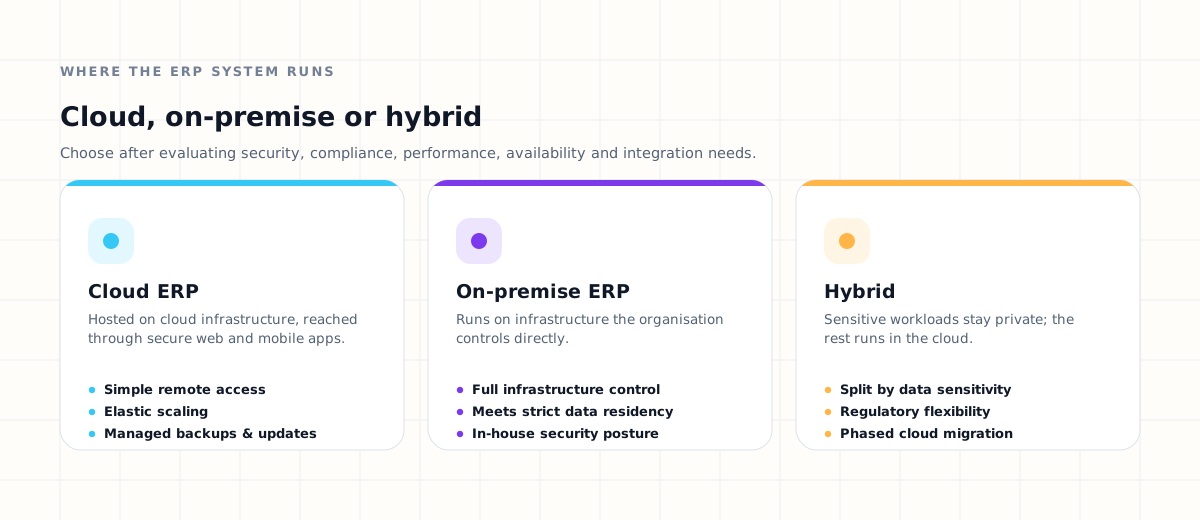
Another important decision is where the ERP system will operate.
Cloud ERP
Cloud ERP systems are hosted on cloud infrastructure and accessed through secure web or mobile applications. They simplify remote access, deployment, infrastructure scaling, monitoring, backups, and updates.
On-premise ERP
An on-premise ERP runs on infrastructure controlled directly by the organisation. Some businesses choose this model because of specific infrastructure, security, operational, or regulatory requirements.
Hybrid architecture
Some businesses need a combination of cloud and private infrastructure. The correct architecture should be selected after evaluating security, compliance, performance, availability, integration, and operational requirements — not chosen by default.
Security in ERP software development
ERP platforms hold some of an organisation's most important operational information. Security therefore needs to be part of the architecture rather than something added after development. Important considerations include:
- Role-based access control
- User authentication
- Data encryption
- Audit logs
- API security
- Activity monitoring
- Secure backups
- Permission management
- Infrastructure monitoring
- Secure development practices
Users should only be able to access the information their responsibilities require. An HR employee may need employee records, for example, but should not automatically receive access to sensitive financial or administrative systems.
How custom ERP development works
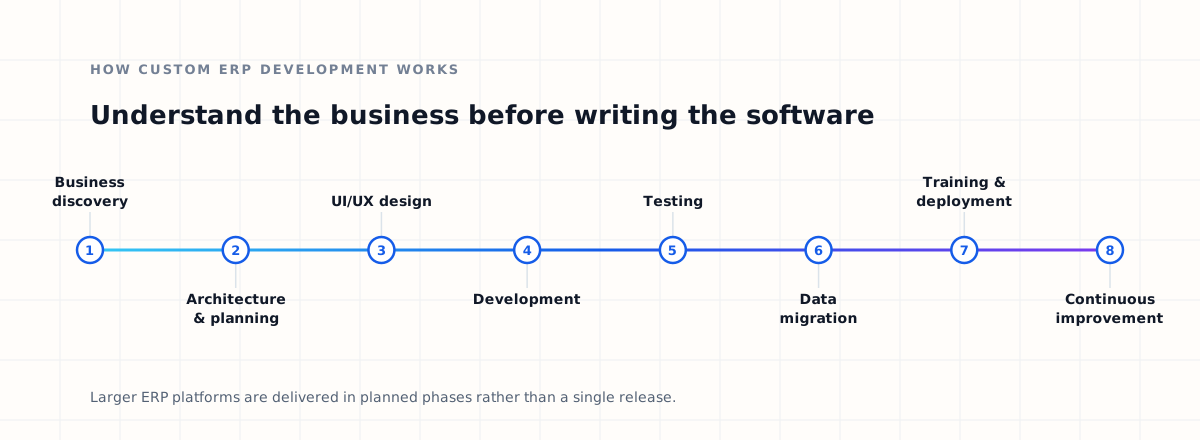
A successful ERP project begins with understanding the business, not with writing software. The eight stages below summarise the build; the wider ERP implementation process covers discovery, migration, training and rollout in more depth.
Step 1 — Business discovery
The development team studies existing workflows, departments, current software, manual processes, approval flows, reporting requirements, user roles, integrations, and operational problems. This stage identifies what should actually be built.
Step 2 — ERP architecture and planning
The platform architecture, database model, integrations, permissions, modules, and deployment strategy are planned. The goal is a foundation that supports both current requirements and future expansion.
Step 3 — UI/UX design
ERP software is used repeatedly, every day, by employees, so usability matters. Common operations should be simple to understand and efficient to complete, and dashboards should show relevant information without overwhelming users.
Step 4 — Development
The team builds modules, APIs, integrations, dashboards, workflows, and administration systems. Complex ERP platforms are usually developed in phases rather than by attempting to release every possible feature at once.
Step 5 — Testing
Testing typically covers functional, integration, security, performance, permission, and user acceptance testing. Because ERP software touches multiple departments, testing is particularly important here.
Step 6 — Data migration
Existing customers, products, transactions, employees, suppliers, and other records need to be transferred into the new system. Data should be cleaned, validated, mapped, and migrated carefully — this step is regularly underestimated.
Step 7 — Training and deployment
Employees need to understand how the new workflows operate. Training, documentation, and onboarding significantly influence whether the system is genuinely adopted.
Step 8 — Continuous improvement
ERP development does not end at launch. As business processes evolve, organisations introduce new modules, reports, integrations, automations, and workflows.
How much does custom ERP software development cost?
There is no universal price for custom ERP development. Cost depends on the complexity of the system. Major factors include:
- Number of modules
- Number of users
- Number of locations
- Workflow complexity
- Third-party integrations
- Reporting requirements
- Mobile application requirements
- Data migration
- Security requirements
- Infrastructure
- UI/UX complexity
- Maintenance and support
A business requiring CRM, sales, HR, inventory, accounting, procurement, advanced reporting, mobile applications, and external integrations naturally needs more development than a company connecting a handful of workflows. ERP projects should therefore be estimated after requirement analysis rather than against a generic fixed price. We break down the factors that affect ERP development cost in a separate guide, with indicative ranges by system size.
When does your business need an ERP system?
It is worth evaluating ERP implementation if any of these sound familiar:
- Employees repeatedly enter the same information in different systems.
- Important processes depend heavily on spreadsheets.
- Departments cannot easily access each other's information.
- Management struggles to obtain accurate operational reports.
- Manual approvals are slowing down operations.
- Existing software cannot support new workflows.
- Growth is making current processes difficult to manage.
- You operate several branches or departments.
- Integrations between existing applications are becoming difficult.
- Your team spends significant time preparing reports by hand.
ERP software is most valuable when it solves identifiable operational problems. The goal is not to implement more software — it is to simplify how the business operates.
Choosing an ERP software development company
An ERP system becomes part of the operational foundation of a business, so choosing a technology partner requires more than comparing development prices. Look for a team that understands:
Business processes
Developers should understand why workflows exist, not simply reproduce existing screens in a new interface.
System architecture
The platform should be designed for scalability, security, integration, and maintainability from the start.
API integrations
ERP systems frequently need to communicate with external applications, so experience with APIs and integration architecture matters.
UI/UX
ERP software should remain understandable even when the underlying business processes are complex.
Deployment and infrastructure
Your partner should understand how the system will be deployed, monitored, secured, backed up, and scaled.
Long-term support
Business systems evolve. Choose a partner capable of supporting improvements, integrations, optimisation, and new requirements after launch.
Build an ERP system around your business
The best ERP is not the one with the most features
It is the system that connects the right processes, gives teams the information they need, removes unnecessary manual work, and grows with the organisation. Dynsimulation Technologies designs and develops ERP platforms, enterprise systems, integrations, automation, and scalable digital infrastructure for modern businesses.
Our Dynatlas platform already connects sales, customer support, accounts, CRM, HRM, procurement, expenses, reporting, and integrations within a single business-management environment.
Frequently asked questions about custom ERP development
What is custom ERP software?
Custom ERP software is an enterprise management system designed around a specific organization's processes, departments, workflows, integrations, users, and reporting requirements.
What does an ERP system manage?
Depending on the business, ERP software can manage sales, CRM, accounting, inventory, procurement, HR, customer support, operations, projects, reporting, and other business processes.
Is custom ERP better than ready-made ERP software?
Neither option is universally better. Ready-made ERP can work well for standardised requirements, while custom ERP may be more appropriate when businesses have specialised workflows, integrations, operational requirements, or long-term customisation needs.
Can ERP software integrate with existing applications?
Yes. ERP platforms can use APIs and integrations to connect with payment gateways, accounting applications, CRM tools, analytics platforms, communication systems, cloud services, and other business applications.
Can ERP systems be cloud based?
Yes. ERP platforms can operate on cloud infrastructure, private infrastructure, on-premise infrastructure, or hybrid environments depending on the organisation's requirements.
How long does ERP development take?
Development time depends on the number of modules, integrations, business workflows, security requirements, data migration requirements, and overall complexity. Larger ERP implementations are often delivered through planned phases rather than a single release.
Can an ERP system be expanded later?
A scalable ERP architecture can allow businesses to introduce additional modules, users, locations, reports, integrations, and automation as requirements evolve.
Who should consider custom ERP development?
Businesses with complex workflows, multiple departments, disconnected software, repetitive manual processes, reporting difficulties, or specialised operational requirements may benefit from evaluating a custom ERP solution.
- Custom ERP vs Off-the-Shelf ERPSee where a tailored build genuinely beats a ready-made platform, and where it does not.
- ERP Software Development CostUnderstand which requirements actually move an ERP budget before you set one.
- ERP Implementation ProcessFollow the stages that take an ERP from discovery through migration to a stable go-live.