
An ERP system becomes the operational backbone of a growing business. But nobody buys or builds “an ERP” the way they buy a laptop. What they get is a set of ERP modules, each responsible for one part of the organisation, all reading and writing the same underlying records.
One module manages customers and the sales pipeline. Another runs finance. Others handle inventory, procurement, employees, approvals, documents and reporting. Individually, none of them is remarkable — there is a decent standalone product for every one of them. The value appears when they stop being separate.
That chain either runs by itself or it runs on people copying numbers between systems. The difference between those two situations is what an ERP is for.
This guide covers twelve essential ERP modules, what each one does, which businesses genuinely need them, how to decide the order, and how connected ERP software modules change day-to-day operations.
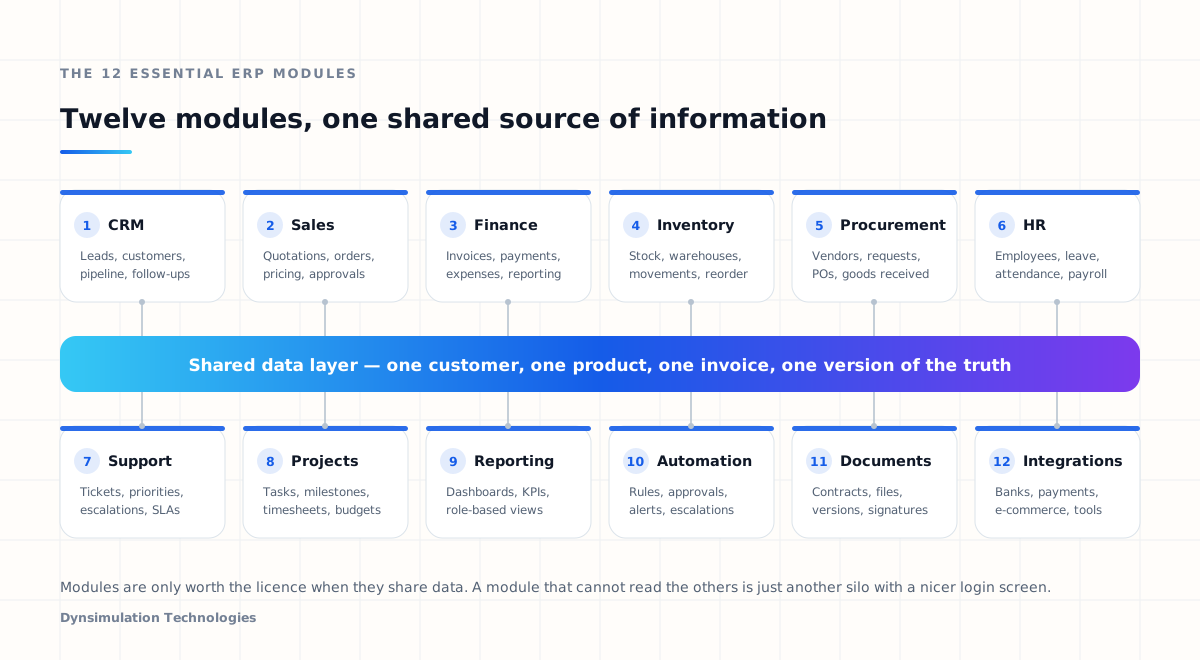
What are ERP modules?
ERP modules are the individual components of an Enterprise Resource Planning platform. Each module focuses on a particular business function, and each one shares a single definition of the things the business cares about: the customer, the product, the order, the invoice, the employee.
Common enterprise resource planning modules include:
- CRM
- Sales
- Finance and accounting
- Inventory
- Procurement
- Human resources
- Customer support
- Project management
- Reporting and business intelligence
- Workflow automation
- Document management
- Integrations and APIs
No business needs all of them on day one, and plenty never need some of them at all. The right structure depends on industry, company size, how many departments hand work to each other, the systems already in place, and what management needs to see — which is why custom ERP development usually starts from workflows rather than from a module list.
A ten-person consultancy might need CRM, invoicing, projects and reporting. A distributor with three warehouses cannot function without inventory and procurement. A manufacturer needs production planning that neither of the other two would ever open.
A useful test for whether something deserves to be a module in your ERP: does at least one other part of the business need the data it produces? If nothing downstream depends on it, a standalone tool may serve you better and cost less.
Why ERP modules have to be connected
Most organisations that consider an ERP already own plenty of software. That is the point. The problem is rarely a missing application; it is that the applications do not talk to each other.
The familiar version of this looks like:
- Sales works in a CRM
- Finance works in accounting software
- HR keeps a separate platform
- Inventory lives in spreadsheets
- Management receives reports from all of them, separately, late
And the consequences are always the same:
- The same data entered three times
- Three versions of the same customer
- Reports assembled by hand every month
- Approvals sitting in inboxes
- No reliable view of what is actually happening
- Integration work that nobody owns
ERP software fixes this by letting modules share information rather than exchange copies of it. A customer created in CRM is immediately the same customer finance will invoice. An approved sale reduces available stock. A supplier purchase updates expenses. Dashboards read from all of it without anyone exporting a file.
This is the honest dividing line between an ERP and a folder full of SaaS subscriptions. Integration by API is good. A shared data model is better, because there is no second copy to fall out of sync in the first place.
The 12 essential ERP modules
What follows is what each module does, what it typically contains, and — more usefully — what tends to go wrong when a business does not have it.
1CRM module
Customer Relationship Management handles everything that happens between the company and a prospect or customer before, during and after a sale.
- Lead capture and qualification
- Customer and contact profiles
- Opportunity tracking
- Sales pipeline stages
- Follow-up reminders
- Communication history
- Lead assignment and ownership
- Customer segmentation
Why it matters
Without a central CRM, the sales picture is spread across spreadsheets, inboxes, chat apps and individual memory. Nobody can answer basic questions reliably: who owns this lead, when was the customer last contacted, which deals are real, why did we lose the last three.
Inside an ERP, the customer record does not stop at the sales team. The same record carries through the whole lifecycle:
2Sales management module
The sales module turns opportunities into revenue and keeps the commercial rules of the business in one place.
- Quotations and proposals
- Sales orders
- Price lists and currencies
- Discount rules and approvals
- Contracts and renewals
- Sales targets
- Commission calculations
- Sales performance reports
The automation here is where most of the value sits. A salesperson builds a quotation; if the discount crosses a threshold, the system routes it to a manager instead of relying on someone to remember the policy. Once accepted, the quotation becomes an order, and that order triggers stock reservation and invoicing without a single email.
Pricing and discount rules are also where custom ERP modules earn their keep. Volume tiers, contract pricing, regional rules and partner margins are rarely standard, and forcing them into a rigid off-the-shelf pricing engine tends to push the real logic back into spreadsheets.
3Finance and accounting module
Finance is the module most businesses cannot avoid for long, because every other module eventually produces a financial consequence.
- Invoices and credit notes
- Payments and receipts
- Expenses
- Accounts payable
- Accounts receivable
- Bank reconciliation
- Tax records and compliance
- Cash flow and profit and loss
Connected to sales and procurement, the finance module stops being a data-entry job. A completed sales order generates the invoice. A received payment updates the customer balance, receivables and the revenue figure on the management dashboard at the same moment. Reconciliation becomes a review task rather than a reconstruction exercise.
Finance is also the module with the least tolerance for approximation. Tax treatment, rounding, currency handling and audit trails need to be right on day one, which is why it is worth implementing carefully rather than quickly.
4Inventory management module
Essential for any business that sells, stores, manufactures or distributes physical goods.
- Product and variant management
- Stock levels by location
- Multiple warehouses
- Stock movements and transfers
- Batch and expiry tracking
- Serial numbers
- Reorder points and low-stock alerts
- Stock valuation
Without central inventory control, the failure modes are predictable and expensive: selling stock that is not there, holding stock nobody ordered, buying twice because two people checked two different sheets, and quoting delivery dates that cannot be met.
An ERP inventory module updates automatically as goods are purchased, transferred, sold, returned or adjusted, so the number on the screen is the number in the warehouse.
5Procurement module
Procurement governs how money leaves the business for goods and services, and who is allowed to authorise it.
- Vendor and supplier records
- Purchase requests
- Approval workflows and limits
- Supplier quotations and comparison
- Purchase orders
- Goods received notes
- Supplier invoices and matching
- Procurement spend reporting
The workflow it replaces usually looks like this:
Handled over email and spreadsheets, none of that is auditable six months later. Handled in an ERP, every approval, amendment and receipt sits on the record, and three-way matching between the order, the delivery and the invoice becomes automatic rather than aspirational.
6Human resource management module
An HR module holds employee information and takes the administrative load off managers and the HR team.
- Employee profiles and contracts
- Departments and reporting lines
- Attendance and shifts
- Leave requests and balances
- Payroll inputs
- Performance reviews
- Documents and expiry tracking
- Recruitment, onboarding and offboarding
Self-service is the feature that decides whether an HR module gets used. An employee submits leave, the manager approves it in one click, the balance updates itself, and payroll sees the result without a separate message. If the process still requires an email to HR, the module has not changed anything.
HR data is also the most sensitive data in the system, so permissions here deserve more thought than anywhere else in the platform.
7Customer support module
The post-sale relationship is where recurring revenue is won or quietly lost.
- Support tickets and channels
- Categories and priorities
- Assignment and ownership
- Escalation rules
- SLA monitoring
- Resolution tracking
- Service history
- Customer satisfaction feedback
Connecting support to CRM, sales and finance changes the quality of every conversation. Before the agent replies, they can already see the customer profile, what was purchased and when, previous tickets, outstanding invoices and the full communication history — instead of asking the customer to explain their own account back to them.
8Project management module
Necessary for any business that delivers work rather than products: consultancies, agencies, engineering firms, technology companies and professional services.
- Projects and phases
- Tasks and dependencies
- Team allocation
- Milestones and deadlines
- Timesheets
- Project expenses
- Budgets and forecasts
- Progress and utilisation tracking
Standalone project tools track work. A project module inside an ERP tracks profit, because it can put project revenue and project cost — including salaried time, expenses and purchased services — on the same page. Many service businesses discover their least profitable clients this way.
9Reporting and business intelligence module
An ERP accumulates an enormous amount of operational data. Reporting is what turns it into decisions.
The important design principle is that dashboards are role-specific. A single “company dashboard” is almost always ignored by everyone.
Executive view
- Revenue and margin
- Expenses
- Pipeline value
- Operational KPIs
- Trend against target
Sales manager view
- Active leads
- Conversion rates
- Quota progress
- Team performance
- Stalled opportunities
Finance view
- Receivables ageing
- Payables due
- Expense breakdown
- Cash flow
- Overdue accounts
The measure of success is simple: how many hours per month disappear from the job of assembling spreadsheets before a management meeting. In most companies that number is embarrassing before the ERP and close to zero after it.
10Workflow automation module
Automation is where an ERP stops being a place to record work and starts doing some of it. Rules run against the data the other modules produce.
- If an invoice is 7 days overdue, send a reminder and flag the account
- If a purchase exceeds a set amount, request director approval
- If stock falls below its minimum level, create a procurement request
- If a support ticket breaches its SLA, escalate it to a manager
- If a contract expires in 30 days, notify the account owner
Businesses typically automate:
- Approvals
- Notifications and reminders
- Task assignment
- Follow-ups
- Scheduled reports
- Document generation
- Status transitions
- Escalations
Beyond the time saved, automation makes process compliance the default. A rule in the system is followed every time; a rule in a policy document is followed when people remember it.
Automate the process you want, not the process you have. Encoding a broken approval chain into software makes it permanent and harder to argue with.
11Document management module
Every transaction in the modules above generates paperwork, and that paperwork usually ends up in a shared drive that nobody can search.
- Contracts and agreements
- Invoices and purchase orders
- Employee documents
- Customer and supplier records
- Project deliverables
- Certificates and licences
A document module stores files against the record they belong to — this customer, this employee, this supplier, this project, this transaction — so retrieval is a click rather than an archaeological dig through email attachments.
Mature implementations add:
- Version history
- Access permissions
- Approval workflows
- Digital signatures
- Expiry reminders
- Retention and audit trails
12Integration and API module
Modern ERP platforms do not operate alone, and they should not try to. Businesses already run specialised tools that are better at their job than any ERP module will be.
- Payment gateways
- Banking and open banking APIs
- Accounting platforms
- E-commerce systems
- Shipping and logistics providers
- Email, SMS and WhatsApp
- Identity and KYC verification
- Cloud storage and analytics
An API-first architecture is what keeps the ERP from becoming the thing that blocks the next project. Instead of replacing every existing application, the business connects specialised systems to a central platform and keeps the option of changing any one of them later.
Judge an ERP by its API before you judge it by its feature list. Features you do not have can be built; a closed platform you cannot integrate with is a ceiling you will hit within two years.
Industry-specific ERP modules
Beyond the core twelve, most industries need something that would be dead weight for everyone else. These are usually the modules worth building rather than buying, because they encode how the business actually competes.
Manufacturing
- Bill of materials
- Production planning
- Work orders
- Raw material consumption
- Quality control
- Machine capacity
Logistics and distribution
- Deliveries and dispatch
- Fleet management
- Route planning
- Shipment tracking
- Proof of delivery
- Freight costing
Asset management
- Equipment register
- Vehicles and machinery
- IT hardware
- Maintenance schedules
- Depreciation
- Assignment history
Compliance and audit
- Audit trails
- Document verification
- Approval histories
- Risk controls
- Retention policies
- Regulatory reporting
Field service
- Technician scheduling
- Work orders
- Customer visits
- GPS and check-ins
- Mobile reporting
- Parts consumption
Retail and e-commerce
- Point of sale
- Multi-channel orders
- Returns and refunds
- Promotions
- Store-level stock
- Customer loyalty
The ERP should adapt to the operational reality of the business. When it works the other way round, employees invent workarounds and the data quietly stops being trustworthy.
How ERP modules work together
The clearest way to see the value of connected ERP system modules is to follow one transaction through the whole platform.
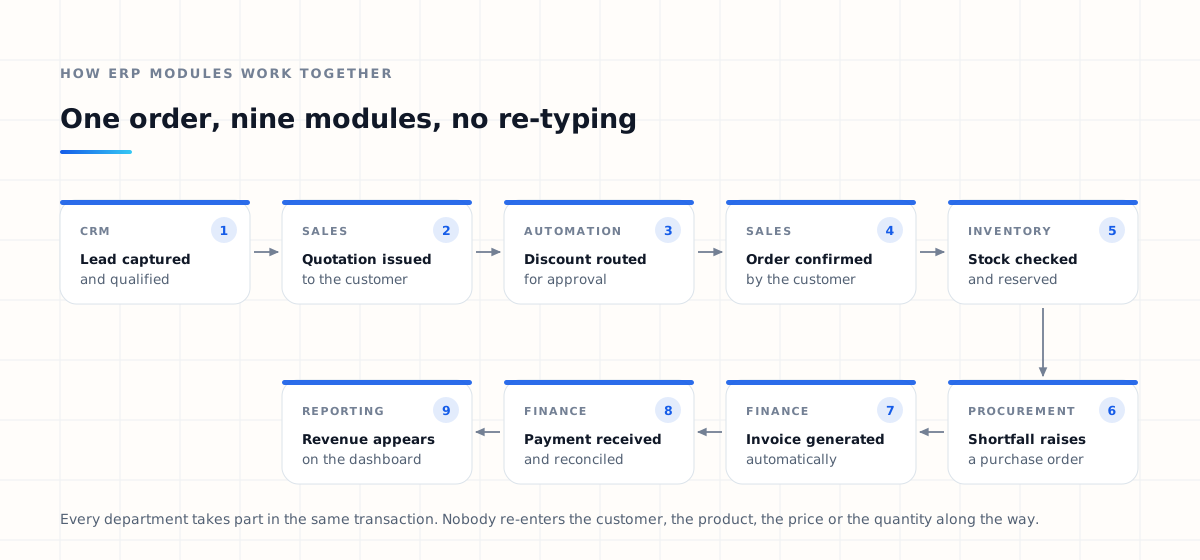
A customer gets in touch. What happens next:
- CRM — the enquiry becomes a lead with an owner and a follow-up date
- Sales — the lead becomes an opportunity and receives a quotation built from the price list
- Automation — the requested discount exceeds policy, so approval routes to a manager automatically
- Sales — the customer accepts and the quotation converts into a confirmed order
- Inventory — stock is checked and reserved against the order
- Procurement — the shortfall raises a purchase request, then a purchase order to the supplier
- Finance — the invoice is generated from the order, not typed from it
- Finance — payment is received, matched and reconciled against the customer balance
- Reporting — the revenue appears in the management dashboard the same day
Every department took part, and no one carried information across a boundary by hand. That is the entire argument for ERP, and it is worth measuring against your current process before deciding which modules to build.
Which ERP modules does your business need?
Start from problems, not from feature lists. Vendors sell modules; businesses have bottlenecks. The useful question is not “which ERP features are available” but “where does work currently get stuck, duplicated or lost”.
Ask the people doing the work:
- Which processes consume the most staff time each week?
- Where do mistakes keep happening, and what do they cost?
- Which departments still depend on spreadsheets to function?
- Which approvals sit in inboxes for days?
- Which reports take someone a full day to produce?
- Which pieces of information exist in three systems at once?
The answers point directly at the first module. If sales information is scattered, CRM comes first. If finance spends two days a month rebuilding invoices, finance automation matters more. If stock visibility is poor and orders are being promised against imaginary inventory, inventory management should not wait.
If you cannot describe what a module will stop happening, you are not ready to build it yet. “We should probably have HR” is not a requirement; “managers spend two days a month chasing leave approvals by email” is.
ERP modules by company size
Company size is a rough guide rather than a rule, but the pattern holds often enough to be useful.
| Stage | Typical modules | What the ERP is solving |
|---|---|---|
| Small business | CRM, sales, invoicing, expenses, basic HR, simple reporting | Replace spreadsheets and email threads with one record of the customer and the money. |
| Growing business | Inventory, procurement, customer support, advanced finance, workflow automation, project management, integrations | Departments now hand work to each other, so the handovers are where the time is lost. |
| Large enterprise | Multi-company and multi-branch, multi-currency, granular permissions, custom workflows, audit controls, advanced reporting, API platform, mobile apps | Scale, control and governance matter as much as features. Architecture becomes the constraint. |
Smaller companies rarely need an enterprise platform on day one, and paying for one is the fastest way to end up with an expensive system that four people log into. The architecture, though, should assume growth even when the module list does not.
Should you build all ERP modules at once?
Almost never. Launching twelve modules simultaneously multiplies every category of risk in the same week:
- Project complexity
- Training load on every department at once
- Data migration exposure
- Testing surface area
- Upfront cost before any value is proven
- The chance that one failure discredits the whole system
A phased rollout gets value into the business earlier and lets each phase teach you something about the next one. Our guide to phased ERP implementation sets out how those phases are planned, tested and deployed.
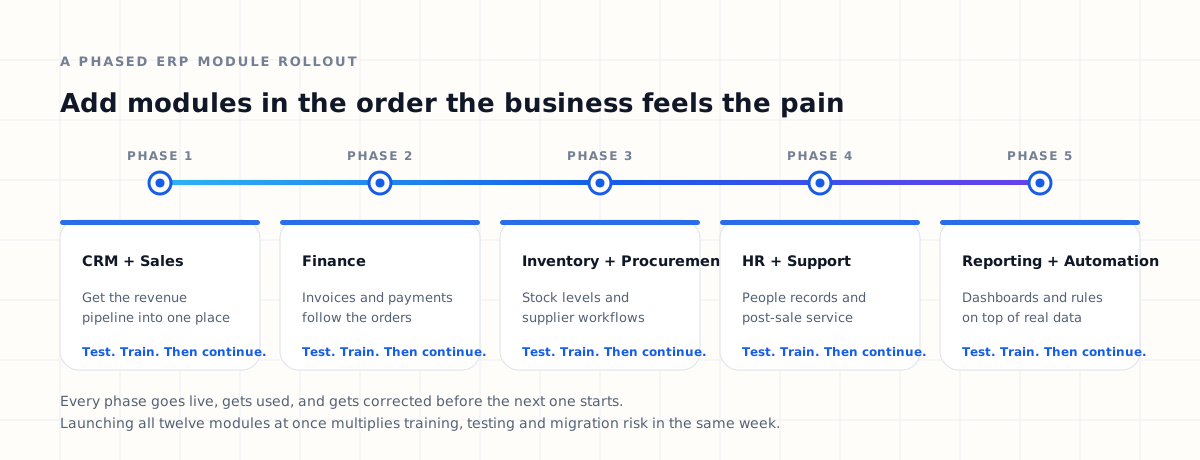
Each phase should go live, be used properly, and be corrected before the next begins. Teams that skip that pause usually spend the saved time twice over during phase four.
One caveat on phasing: the data model should be designed for the full picture from the beginning, even if only three modules are built. Retrofitting a shared customer or product model into a system that grew module by module is one of the more expensive mistakes in enterprise software.
Custom ERP modules vs ready-made modules
Ready-made ERP software ships with prebuilt modules and is a strong choice wherever your processes are genuinely standard. Invoicing, leave requests and basic stock control are solved problems, and rebuilding them is rarely a good use of a budget.
Custom ERP modules make sense when the business has:
- Workflows that no packaged product models
- Multi-step or conditional approval chains
- Proprietary pricing or costing calculations
- Industry-specific or regulated processes
- Integrations that are core to the operation
- Reporting that the standard product cannot express
The two failure modes are symmetrical and both common. One is building custom software for a problem a reliable product already solves. The other is bending a genuinely distinctive operation to fit software that cannot represent it, then absorbing the cost in manual workarounds forever.
Most healthy ERP platforms end up mixed: standard modules where the business is standard, custom modules where it is not, and APIs holding the two together. Our comparison of custom ERP versus off-the-shelf ERP goes through that decision in more detail.
How to prioritise ERP modules
When several modules look necessary at once, score each one against five criteria rather than arguing about them abstractly.
Business impact
How much money or management attention does this module free up? A module that shortens the order-to-cash cycle usually beats one that tidies up an internal report.
Current pain
How bad is the existing process? Count the hours spent, the errors made, and the number of people who have to be chased each month.
Dependency
Do other modules need this one first? Invoicing depends on orders, orders depend on customers and products, so the foundation modules earn their place early.
Implementation complexity
How much data migration, integration and configuration does it require? Complexity is not a reason to skip a module, but it is a reason to sequence it honestly.
User adoption
How many people will use it daily, and will they want to? A module used by forty people every morning returns more than one used by two people each quarter.
Modules with high impact, high current pain and manageable complexity go first. Modules that are complex, low impact and used by few people go last, and some of them turn out never to be needed at all — which is itself a good outcome, discovered cheaply. Since module count is one of the strongest drivers of ERP development cost, that shortlist is also the budget conversation.
Benefits of a modular ERP architecture
Modularity is an architectural decision, not a marketing one. It determines how the system can change once it is live.
- Smaller initial scope and faster first release
- Value delivered before the full platform exists
- Easier training, department by department
- Lower risk per release
- Individual areas can be improved without touching the rest
- New integrations without re-architecting the core
When requirements change — and they will — a modular platform lets the business improve one area instead of replacing the whole ERP. For fast-growing companies, that difference compounds over the life of the system and usually costs less than the licence fees people spend their time negotiating.
How Dynsimulation approaches ERP modules
ERP development should start with business workflows, not with a feature checklist. Before deciding which modules to build, it is worth mapping how work actually moves between departments today, including the informal steps nobody documents.
At Dynsimulation Technologies we design ERP platforms around those workflows, connecting CRM, sales, finance, inventory, procurement, human resources, customer support, reporting, document management, workflow automation and integrations into a single environment — and building the custom modules a business needs where standard ones do not fit.
That is what our connected ERP solution is: a connected set of modules sharing one definition of the customer, the product, the order and the invoice, extended with custom work where a business needs it.
Build ERP modules with Dynsimulation
Start with the module that hurts most
Whether you need one specialised ERP module or a connected enterprise platform, the architecture should be designed around the way your organisation actually operates. We work across custom ERP development, API integrations, workflow automation, cloud infrastructure and enterprise software architecture.
Our Dynatlas platform connects CRM, sales, finance, inventory, procurement, HR, customer support, reporting and integrations in one environment, and extends with custom modules where your processes are genuinely your own.
Frequently asked questions about ERP modules
What are ERP modules?
ERP modules are the individual components of an Enterprise Resource Planning platform. Each one manages a specific business area such as sales, finance, inventory, procurement, HR or reporting, and they share a single set of underlying records so that information entered once is available everywhere it is needed.
What are the most important ERP modules?
The modules most businesses end up needing are CRM, sales, finance and accounting, inventory, procurement, human resources, customer support, project management, reporting and business intelligence, workflow automation, document management, and integrations. Which of them matter first depends entirely on where the business currently loses time.
Does every business need all ERP modules?
No. Buying or building modules nobody uses is one of the most common ways to waste an ERP budget. Modules should be selected against real operational problems, and the rest can wait until the business genuinely needs them.
Can ERP modules be added later?
Yes, provided the platform has a modular architecture and a shared data model. Adding a module later should mean extending an existing system rather than starting a second one, which is why the architecture decision matters more at the start than the module list does.
Which ERP module should be implemented first?
Start with the module that removes the most manual work or the most expensive mistakes. For a sales-led company that is usually CRM and sales; for a distributor it is often inventory; for a business drowning in reconciliation it is finance.
Can ERP modules integrate with existing software?
Yes. A well-designed ERP exposes APIs and webhooks so it can exchange data with accounting platforms, payment gateways, banks, e-commerce systems, shipping providers, messaging services and internal applications, rather than forcing every tool to be replaced at once.
What is an ERP finance module?
A finance module manages invoicing, payments, expenses, accounts payable and receivable, reconciliation, tax records, cash flow and financial reporting. Connected to sales and procurement, it generates most of those records automatically instead of requiring them to be keyed in again.
What is an ERP CRM module?
An ERP CRM module manages leads, customer profiles, opportunities, pipeline stages, communication history and follow-ups, and it passes the resulting customer record on to quotations, orders, invoices and support tickets.
What is an ERP inventory module?
An inventory module manages products, stock levels, warehouses, transfers, batch and serial tracking, reorder points and stock valuation, and updates automatically as goods are purchased, sold, returned or adjusted.
What is the difference between an ERP module and standalone software?
Functionally they can look similar. The difference is the data. A standalone tool keeps its own copy of customers, products and transactions and has to be reconciled with everything else; an ERP module reads and writes the same records as every other module.
Can custom ERP modules be developed?
Yes. Custom modules are worth building where a workflow is genuinely specific to the business or its industry — specialised approvals, proprietary calculations, regulatory processes or an integration the company depends on. For standard processes, prebuilt modules are usually the better investment.
How many ERP modules should a small business start with?
Usually three or four. CRM, sales and invoicing with basic reporting covers most early operational pain, and later modules can be added once those are being used properly.
- Custom ERP Software DevelopmentThe full build guide — architecture, modules, integrations and delivery phases.
- ERP Implementation ProcessFollow the stages that take an ERP from discovery through migration to a stable go-live.
- Custom ERP vs Off-the-Shelf ERPSee where a tailored build genuinely beats a ready-made platform, and where it does not.